Linux single board computers are used in many embedded products because they give engineering teams a useful middle ground. They are more capable than small microcontroller boards, but usually easier to bring up than a fully custom processor platform. For products that need networking, local storage, a display, USB devices, camera input, serial communication, cloud connectivity, or long-running background services, a Linux SBC can be a practical starting point.
That does not mean every Linux SBC is ready for production. A board that works well on a developer's desk may still need careful review before it goes inside an industrial controller, smart terminal, IoT gateway, medical device, retail machine, or automation product. The difference between a working demo and a reliable product is often found in small details: power input range, boot recovery, kernel support, storage wear, enclosure temperature, connector placement, and the way the board is tested in manufacturing.
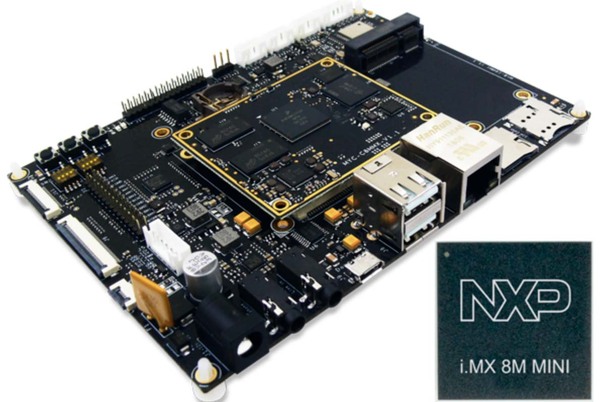
This article looks at Linux SBC selection and integration from an engineering point of view. It is not about chasing the fastest processor or the longest specification sheet. It is about choosing a platform that can survive the actual product environment.
Start With The Product, Not The Board
A Linux SBC should be selected after the product requirements are clear. It is tempting to begin by comparing CPU cores, memory size, GPU support, and benchmark scores. Those numbers matter, but they are not enough. In many embedded products, the processor is not the main risk. The real risk is whether the board supports the correct interfaces, boots reliably, handles power loss, stays cool in the enclosure, and can be supplied for the expected product lifetime.
Before choosing a board, I usually want to know where the product will be installed, what equipment it connects to, what operating conditions it must handle, and how the software will be maintained after deployment. A Linux SBC used in a smart display is not the same as one used in a protocol gateway. A board used inside a metal cabinet near industrial equipment has different concerns from one used in an indoor information terminal.
| Product Question | Why It Matters | Typical Design Impact |
|---|---|---|
| Will the product run headless or with a display? | Display products need stable graphics, touch, and UI performance. | HDMI, LVDS, eDP, MIPI, GPU driver, touch controller support. |
| What field interfaces are required? | Industrial products often need more than USB and Ethernet. | RS485, RS232, CAN, GPIO, relay, isolated I/O, terminal blocks. |
| What power source is available? | Lab supplies are stable; field power often is not. | Wide input, surge protection, reverse polarity protection, watchdog. |
| How will updates be delivered? | Remote devices must recover from failed updates. | A/B root filesystem, signed updates, rollback, recovery partition. |
| How long must the product stay in production? | Consumer boards can change quickly. | Lifecycle planning, component availability, controlled BOM. |
Linux Is Useful Because It Has Real System Tools
The reason Linux appears so often in embedded products is not only that it is open source. It is useful because it already has a mature set of system services and development tools. Networking, file systems, process management, security tools, remote login, logs, update frameworks, and device drivers are all part of the ecosystem.
For an IoT gateway, Linux can run MQTT clients, Modbus services, local databases, VPN clients, firewall rules, and remote diagnostic agents. For a smart terminal, it can support a browser engine, Qt application, camera preview, printer, barcode scanner, and local data storage. For a machine controller, it can communicate with PLCs, collect logs, expose a local web interface, and forward selected data to a server.
This flexibility is one of the main reasons teams choose Linux SBCs. But flexibility also creates responsibility. If the system image is not controlled, services are left open, logs grow without limits, or kernel drivers are not maintained, the same flexibility can create field problems.
Board Support Package Quality Is A Major Factor
A Linux SBC is only as good as its board support package. A board may boot a Linux image, but that does not mean the BSP is production-ready. The kernel, bootloader, device tree, peripheral drivers, power management, thermal behavior, and recovery logic all need to be checked.
For early evaluation, engineers often focus on whether Ethernet works, whether the display turns on, and whether USB devices are detected. That is a reasonable start, but production testing should go further. Reboot the board many times. Disconnect and reconnect Ethernet. Fill storage close to its limit. Stress the CPU inside the final enclosure. Test power interruption during boot. Check if the watchdog really resets the system when the main application hangs.
Some BSP problems only appear after long testing. A Wi-Fi driver may fail after repeated suspend and resume cycles. A cellular module may need a hardware reset line that was not connected. A display may work at room temperature but fail after the panel cable is routed through the final enclosure. These problems are easier to fix before the product design is frozen.
Storage Reliability Should Not Be Ignored
Many Linux SBC products use eMMC, SD cards, or sometimes NVMe storage. Each option has tradeoffs. SD cards are convenient for development, but they are not always ideal for products that write logs or data continuously. eMMC is usually better for embedded products, but write behavior still needs attention. NVMe can be useful for heavier data workloads, but it adds cost, power draw, and thermal considerations.
Linux systems write more often than some teams expect. System logs, application logs, databases, temporary files, network buffers, and update packages can all produce storage writes. If the product is expected to run for years, the software team should estimate write volume and define log rotation early.
A simple production system should avoid writing debug logs forever. It should separate configuration data from temporary data, handle sudden power loss, and avoid corrupting the filesystem during updates. If a local database is used, the write frequency and sync behavior should be understood. These are not glamorous tasks, but they affect product life directly.
Power Design Around The SBC Matters
Many development boards are powered through USB-C, a barrel jack, or a simple 5 V input. That may be fine in the lab. A product, however, may need 12 V, 24 V, battery input, automotive input, or a noisy industrial supply. The SBC may also need to power USB devices, a display, a wireless module, sensors, or external I/O.
Power design should include more than nominal voltage. Engineers should check inrush current, voltage dips, brownout behavior, reverse polarity protection, surge protection, and how the system behaves after power returns. If the product uses a cellular modem, current spikes during transmission can be significant. If the product drives a display and USB peripherals, the 5 V rail may need more margin than expected.
A practical test is to power-cycle the device repeatedly under real load. Another useful test is to cut power during boot and during a software update. If the system cannot recover cleanly, the product is not ready for remote deployment.
Thermal Testing Must Use The Final Enclosure
A Linux SBC sitting on an open bench may look stable, but enclosure conditions can change the result. A plastic case with little airflow, a sealed industrial enclosure, or a metal cabinet with high ambient temperature can push the processor, PMIC, Wi-Fi module, or storage device into a different operating range.
Thermal testing should be done with the final or near-final enclosure, actual power supply, expected cable connections, and realistic software load. If the product includes a display, wireless module, camera, or heavy network traffic, those functions should be active during testing.
Linux can help with thermal management through CPU governors, throttling, and service control, but software cannot fix a poor thermal path by itself. The board layout, heat spreader, enclosure material, ventilation, and component placement all matter.
Interface Planning Is More Important Than It Looks
Embedded products often fail late in development because interface details were not defined clearly enough. Saying that the product needs “serial communication” is not enough. Does it need RS232, RS485, TTL UART, or CAN? How many ports? What connector? Is isolation required? Is termination required? Is the cable long? Is the port exposed to installers?
The same applies to display, USB, camera, audio, GPIO, and network interfaces. A Linux SBC may support many signals at the processor level, but that does not mean the final board exposes them in the correct way. Pin multiplexing, voltage level, connector type, cable length, and driver support must all line up.
For products that need a custom interface set, teams often start with an off-the-shelf Linux SBC and later move to a custom carrier board or a fully custom SBC. This approach can reduce early software risk while still allowing the production hardware to match the final product. Companies such as Avontek work in this area because embedded products often need both Linux SBC development and manufacturing-aware hardware design.
Security Starts With Basic System Hygiene
Linux gives engineers many useful tools, but it also exposes risks if the system is not configured carefully. A production Linux SBC should not ship with default passwords, unused services, open debug ports, or private keys shared across all devices.
At minimum, the team should define how users authenticate, how remote access is controlled, how updates are verified, and how logs are collected. If SSH is enabled, access should be limited. If a web interface is used, it should have proper authentication. If the device connects to a customer network, the team should be ready to explain which ports are open and which cloud services the device contacts.
Security does not always require a complicated architecture. Many products improve greatly by removing unnecessary services, using signed updates, separating customer credentials, and documenting network behavior.
Manufacturing Test Should Be Planned Early
A Linux SBC product needs a repeatable test process before it leaves the factory. A developer can test a prototype manually, but production needs faster and more consistent methods.
A typical manufacturing test flow may include:
1. Flash bootloader and Linux image 2. Program serial number, MAC address, and product configuration 3. Verify input power and current range 4. Test Ethernet, Wi-Fi, Bluetooth, or cellular module 5. Test USB, serial ports, GPIO, relay, CAN, or other field interfaces 6. Check display, touch, camera, or audio if used 7. Verify storage read and write 8. Run watchdog and reboot tests 9. Save test results against the device serial number 10. Apply final production image and lock debug access if requiredThis process is easier when the hardware is designed with testing in mind. Test pads, fixture access, factory software mode, clear LED indicators, and stable flashing procedures can save a lot of time. If these items are ignored until the end, production can become slow and inconsistent.
When A Standard SBC Is Enough
A standard Linux SBC can be enough for low-volume products, internal equipment, proof-of-concept systems, or projects where enclosure and connector requirements are flexible. It can also be useful when software development needs to start before custom hardware is ready.
The advantages are clear: faster bring-up, lower initial engineering cost, available documentation, and less hardware design risk. The disadvantages usually appear later: limited control over lifecycle, unused connectors, mechanical mismatch, uncertain long-term supply, and a BOM that may not be optimized for the final product.
If the product is expected to scale, it is worth reviewing the standard SBC early and deciding whether it is only a development platform or also the production platform. That decision affects software image management, certification, fixture design, and purchasing strategy.
Final Thoughts
A Linux SBC can be a strong foundation for embedded products, but it should not be treated as a finished product by itself. The board is only one part of the system. The final result depends on BSP quality, power design, storage reliability, thermal behavior, interface planning, software update strategy, security configuration, and manufacturing test coverage.
The best Linux SBC projects usually have a clear path from prototype to production. The team validates software early, but also keeps production constraints in view. They test failure conditions, not only normal operation. They understand what must be customized and what can remain standard.
For embedded products, reliability is usually built through many practical decisions rather than one impressive specification. A good Linux SBC platform helps, but the engineering work around that platform is what makes the product dependable in the field.
下一則: Android SBC or Linux SBC: How to Choose the Right Platform for an Embedded Product
限會員,要發表迴響,請先登入


