RK3576 is a modern ARM-based processor platform suitable for embedded products that need stronger computing performance, flexible interfaces, display output, camera input, network connectivity, and long-term software customization. When RK3576 is designed into an SBC, it becomes a practical hardware foundation for industrial control terminals, HMI panels, smart gateways, machine vision devices, medical equipment, energy systems, retail terminals, and many other application-specific products.
For many industry applications, the operating system does not need to be a full desktop Linux distribution. A production device often needs a compact firmware image, controlled software stack, fast startup, stable services, and reliable field updates. This is where Buildroot becomes valuable. Buildroot allows engineers to build a customized embedded Linux system for RK3576, including the bootloader, kernel, device tree, root filesystem, libraries, services, and application packages.
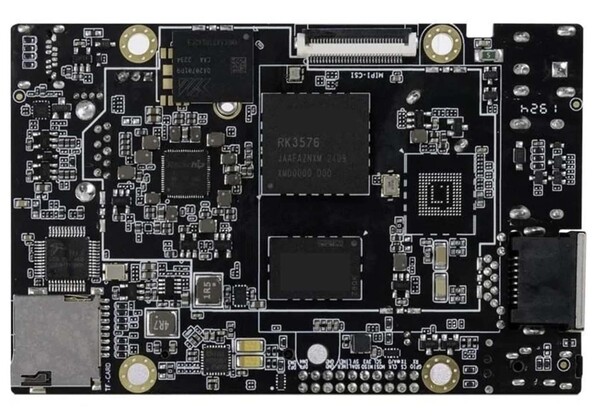
Using RK3576 SBC with Buildroot gives product teams a flexible combination: powerful ARM hardware and a lightweight Linux software platform. It is especially useful when the product needs better performance than an entry-level embedded board but still requires a controlled and production-friendly Linux system.
What Is an RK3576 SBC?
An RK3576 SBC is a single-board computer built around the Rockchip RK3576 SoC. The board usually integrates the processor, DDR memory, eMMC storage, power management, display interfaces, USB, Ethernet, UART, GPIO, I2C, SPI, audio, camera interfaces, and optional wireless communication modules.
Depending on the board design, an RK3576 SBC may support MIPI DSI, LVDS, HDMI, eDP, MIPI CSI, USB 3.0, Gigabit Ethernet, PCIe, CAN, RS485, and other interfaces needed in industrial and commercial products. This makes it much more than a simple development board. It can become the core control and computing platform inside a finished embedded device.
Compared with older low-end ARM platforms, RK3576 offers stronger CPU performance, better multimedia capability, more modern interface support, and better potential for edge computing and advanced HMI applications. It is suitable for products that need a balance between performance, integration, power consumption, and cost.
Why Use Buildroot on RK3576?
Buildroot is an embedded Linux build system designed to generate a complete Linux firmware image from source. It helps engineers build a small and customized system instead of installing a large general-purpose distribution.
For RK3576 SBC projects, Buildroot is useful because many industry devices have fixed functions. A machine control panel may only need a graphical application, Ethernet, RS485, CAN, and local storage. A smart gateway may only need networking, serial communication, MQTT, local data processing, and remote update support. A camera-based inspection device may need camera input, display preview, storage, and network upload.
In these cases, a full Debian or Ubuntu system may include many unnecessary packages and services. Buildroot allows engineers to include only what the product needs. This reduces image size, improves boot control, lowers security exposure, and makes the final system easier to maintain.
Buildroot is also easier to reproduce. Once the configuration is fixed, the same firmware can be rebuilt consistently. This is important for industrial products where firmware version control and repeatable production are required.
Typical System Architecture
A typical RK3576 Buildroot system includes several layers. The bootloader initializes the hardware and loads the Linux kernel. The Linux kernel provides drivers for CPU, memory, display, storage, USB, Ethernet, camera, audio, GPIO, UART, I2C, SPI, and other peripherals. The device tree describes the board-level hardware configuration. The root filesystem contains system libraries, BusyBox, services, configuration files, and application software.
In a production device, the system may boot directly into a dedicated application instead of showing a desktop environment. For example, an HMI product may start a full-screen Qt application. An industrial gateway may start a group of background services. A vision device may start camera capture, image processing, and upload services automatically after boot.
This architecture gives engineers full control over the product behavior. The system can be designed to start quickly, recover from failures, restrict unnecessary user access, and run only the required services.
Industrial HMI Applications
One major use case for RK3576 SBC with Buildroot is industrial HMI. Modern HMI products require clear graphics, touch operation, stable display output, local control, and communication with industrial devices.
RK3576 can drive TFT LCD displays through interfaces such as MIPI DSI, LVDS, HDMI, or eDP depending on the board design. When paired with a capacitive touch panel, the SBC can become a complete embedded HMI platform. The application may display machine status, parameters, alarm records, production data, maintenance pages, charts, and operation menus.
Buildroot helps keep the software stack lightweight. Instead of running a full desktop Linux environment, the product can boot directly into a Qt, LVGL, GTK, or DRM-based application. This reduces boot time and improves system control.
Industrial HMI devices may also need RS485, CAN, Ethernet, GPIO, relay control, and other interfaces. These can be integrated into the Linux application through drivers, device files, or dedicated communication services.
Industrial Gateway and Edge Device Applications
RK3576 SBC can also be used as an industrial gateway or edge computing device. In this role, the board collects data from sensors, PLCs, meters, controllers, or other equipment, then processes or forwards the data to a local server or cloud platform.
Buildroot is a good choice for gateway systems because the software requirements are usually specific and controlled. The root filesystem can include only the required networking tools, protocol libraries, database, security packages, and update services.
Common communication protocols may include Modbus RTU, Modbus TCP, MQTT, HTTP, WebSocket, TCP/IP, CAN, and custom serial protocols. The RK3576 SBC can use Ethernet for stable network access and UART or RS485 for local device communication.
For edge applications, RK3576 can run local logic before sending data to the cloud. This can reduce network traffic, improve response time, and allow the device to continue operating even when the network connection is unstable.
Camera and Vision Applications
Many industry products now require camera input. Examples include inspection equipment, access terminals, machine monitoring systems, barcode scanning devices, medical imaging terminals, agricultural monitoring devices, and smart retail systems.
An RK3576 SBC may support camera input through MIPI CSI or USB, depending on board design. Buildroot can include camera-related tools and libraries such as V4L2 utilities, GStreamer, FFmpeg, OpenCV, or custom image processing applications.
For camera preview or inspection devices, the system may capture frames, display live images, save snapshots, record video, analyze basic image data, or upload results to a server. If the application requires more advanced processing, engineers should evaluate CPU load, memory bandwidth, camera resolution, frame rate, and possible hardware acceleration.
Buildroot is helpful because it allows the vision system to stay focused. Unnecessary desktop services can be removed, and the camera pipeline can be optimized for the actual product requirement.
Device Tree and Hardware Bring-Up
Device tree configuration is one of the most important parts of RK3576 Buildroot development. The device tree tells the Linux kernel how the board hardware is connected. If the device tree is not correct, the display, touch panel, camera, Ethernet, Wi-Fi, GPIO, UART, or power control may not work properly.
Common device tree tasks include enabling display interfaces, configuring panel timing, setting backlight PWM, adding touch controller nodes, defining camera sensors, enabling I2C and SPI devices, configuring UART ports, assigning GPIOs, setting regulator power sequences, and enabling Ethernet PHYs.
For industrial products, hardware customization is common. One customer may need a 10.1 inch LVDS display and RS485. Another may need a MIPI display, dual Ethernet, and CAN. A third may need a camera interface and a compact board shape. Device tree and kernel configuration allow the same software foundation to be adapted to different product designs.
Display and Touch Integration
Display and touch integration are critical in many RK3576 applications. The display must match the selected interface, resolution, timing, backlight control, and power sequence. The touch panel must match the I2C or USB interface, interrupt pin, reset pin, and coordinate mapping.
For HMI products, display quality directly affects user experience. Engineers should consider brightness, viewing angle, resolution, touch response, cover glass, optical bonding, and operating temperature. If the product is used outdoors or near strong light, high brightness and anti-glare treatment may be required.
Touch testing should be done in the final mechanical structure. Capacitive touch performance can be affected by cover glass thickness, grounding, metal frame, cable routing, power noise, and environmental conditions. A touch panel that works well on a desk may behave differently after being installed in the product enclosure.
Root Filesystem Design
Buildroot gives engineers control over the root filesystem. For a production RK3576 device, the root filesystem should include only necessary packages. A small and clean root filesystem reduces storage usage and makes the system easier to test.
A basic root filesystem may include BusyBox, init scripts, network tools, device rules, firmware files, and the main application. More advanced products may include Qt, LVGL, GStreamer, FFmpeg, OpenCV, SQLite, MQTT libraries, OpenSSL, curl, watchdog tools, and custom services.
Engineers should avoid adding packages only because they are convenient during development. Every package increases image size, update complexity, and potential security exposure. Development tools can be included in engineering builds, while production builds should be smaller and more locked down.
Boot Time Optimization
Boot time is important for many industry applications. A machine operator may expect the HMI to become usable quickly after power-on. A gateway may need to start data collection immediately. A monitoring device may need to recover automatically after power loss.
Buildroot helps boot-time optimization because it avoids unnecessary services. Engineers can further reduce startup time by simplifying kernel configuration, removing unused drivers, reducing console output, using a small root filesystem, avoiding slow network wait, and starting the main application early.
For HMI products, the time to first visible screen may be more important than the time to full system completion. A splash screen or early UI can improve user experience while background services continue to start.
Reliability for Industrial Products
Industrial products are expected to run for long periods. Reliability must be designed into both hardware and software.
On the software side, applications should be managed by init scripts or systemd services. If a service crashes, it should restart automatically. A hardware watchdog can help recover from serious system hangs. Logs should be rotated to prevent storage from filling up.
Storage design is also important. If the device writes logs or data frequently, engineers should consider flash wear, file system safety, and power-loss recovery. A read-only root filesystem with a separate writable data partition is often useful for industrial products.
Network reliability should also be tested. The system should recover from cable unplug, DHCP failure, router restart, Wi-Fi loss, server downtime, and temporary communication errors.
Firmware Update Strategy
A production RK3576 Buildroot device should have a clear update strategy. During development, engineers may flash images manually. In the field, devices need a safer update method.
Possible update methods include USB update, SD card update, network OTA update, application-only update, full image update, and A/B partition update. The right method depends on product risk, deployment environment, and maintenance cost.
Field update design should consider failed downloads, wrong firmware versions, power loss during update, broken application packages, rollback behavior, and recovery after boot failure. For important industrial products, firmware verification and rollback support are strongly recommended.
Security Considerations
Many RK3576 industry applications are connected to local networks or cloud platforms. Security should be considered from the beginning.
Production firmware should disable unused services, remove default passwords, restrict SSH access, use secure communication, protect configuration files, verify update packages, and avoid exposing debug interfaces. If the device connects to industrial equipment, unauthorized access could affect operations, not only data privacy.
User permissions should be controlled carefully. The main application should not always run as root unless required. Sensitive credentials should not be stored in plain text. Remote maintenance access should be protected by authentication and network rules.
Production Testing and Manufacturing
RK3576 SBC products should be designed for repeatable production. The firmware should support factory flashing, serial number programming, MAC address programming, hardware revision detection, and automated test procedures.
A factory test application can verify display colors, touch input, Ethernet, Wi-Fi, USB, audio, GPIO, UART, RS485, CAN, camera, storage, and other interfaces. Aging tests can help identify early hardware failures before shipment.
Production firmware should be different from engineering firmware. Debug tools, open accounts, unnecessary services, and test scripts should be removed or restricted. Version tracking should be clear so that every shipped product can be traced to a specific firmware build.
Choosing RK3576 SBC with Buildroot
When selecting an RK3576 SBC for Buildroot-based industry applications, engineers should evaluate both hardware and software support. Hardware performance is important, but BSP quality, kernel support, device tree examples, display driver support, camera support, and vendor documentation are equally important.
Important selection factors include CPU performance, memory size, eMMC capacity, display interfaces, camera interfaces, Ethernet, USB, UART, RS485, CAN, GPIO, Wi-Fi, Bluetooth, power input, operating temperature, mechanical size, thermal design, long-term supply, and technical support.
The best platform is not simply the board with the highest specifications. It is the board that matches the product requirement and can be supported through development, testing, production, and long-term maintenance.
Conclusion
RK3576 SBC with Buildroot is a strong platform for modern industrial and embedded applications. RK3576 provides powerful ARM computing, modern interfaces, display support, camera options, and flexible expansion. Buildroot provides a lightweight, controlled, and reproducible Linux software environment.
This combination is suitable for industrial HMI panels, smart gateways, edge devices, camera systems, medical terminals, energy equipment, commercial devices, and other industry-specific products. It allows engineers to build systems that are smaller and more controlled than desktop Linux platforms while still offering much more capability than simple microcontroller solutions.
A successful RK3576 Buildroot project requires careful planning of hardware interfaces, kernel configuration, device tree, root filesystem, display integration, touch support, storage strategy, update mechanism, security, and production testing. When these elements are designed together, RK3576 SBC with Buildroot can provide a reliable and scalable foundation for industry applications.
下一則: Industrial Display Panels: What They Are, Where They’re Used, and How to Select
限會員,要發表迴響,請先登入


