How to change the language for VDM UCANDAS to the one you want?
2015/05/27 17:37
瀏覽326
迴響0
推薦0
引用0
1) If you need other language beside english, when you get the tool, please send your serail number and language to us, we will open the authorization for you.
2) After software authorization is opened. Then follow our software update video to download and install the update tool and other software
3) If you have doubts for language changing, here is the instruction for the video:
a. First you will see to go official website to download the update tool.
b. After you get the notification of your software language is opened. Install the update tool and connect VDM to PC. After PC read the VDM machine, Click update
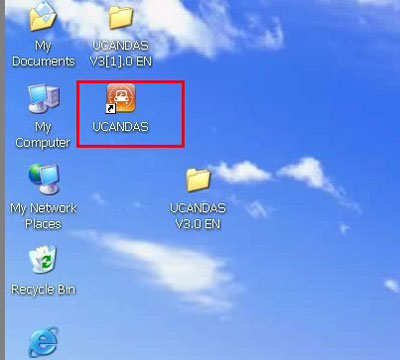
[This is the downloaded update tool]
c.You will enter the interface needs you fill in your information. Then register your information. (Keep remember these information, if you use wrong register information to log in the official website in the future, it will meet error prompt)
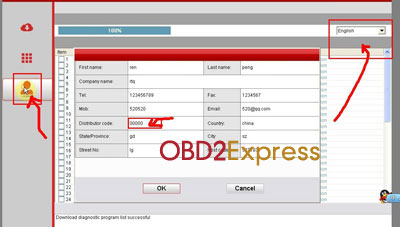
d.In the upper right corner of update interface, after your software is opened ready, you can choose the language you want to download. Then your car software will be downloaded and installed as the language you choose. (This language is for car software. Attention: Language for Car model software and software operation menu is different. Do mot garble it. Only this two language are the same, it will display the car model. Otherwise it will not show any car model after download.)
e. Back to the update tool, you will see the operation language menu. Setup this language to the one you want. Then all the language will be set to the one you want.
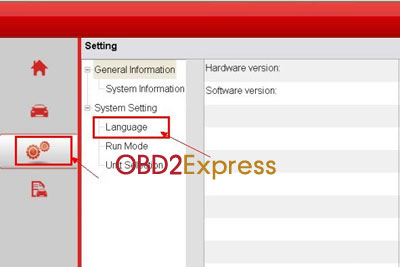
[language setup on update tool]
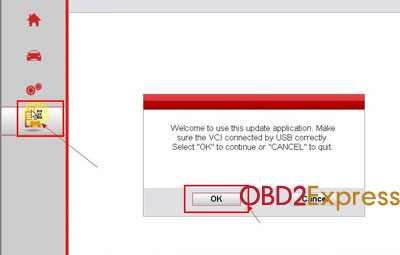
[Click this update menu, then you will enter update interface]
f.There are two uses for update tool: if you do not have the car list, then it is the update tool. After you download the car software and install it ready, then it is the diagnose software.
自訂分類:不分類
上一則: Ford 3pin 5pin and 6pin diagnostic connector pinout下一則: How to install Tis2000 software and how to connect tech2 interface with computer
你可能會有興趣的文章:
- How to do Mercedes W221 W204 all key lost with VVDI MB BGA Tool
- Volvo VCADS pro problem and solution
- Mercedes-Benz S600 an acceleration of the engine fault light will light
- Porsche PIWIS Tester 2 V15.1VCI configuration error solution
- How to install Tis2000 software and how to connect tech2 interface with computer
- SDP3 truck diagnostic tool for Scania error solution
限會員,要發表迴響,請先登入


