How to install Tis2000 software and how to connect tech2 interface with computer
2015/05/26 14:54
瀏覽194
迴響0
推薦0
引用0
GM tech2 is a very popular diagnostic scanner. Below is some question asked by customers. Technician’s answer may help you using the GM tech2 easily.
Question one:
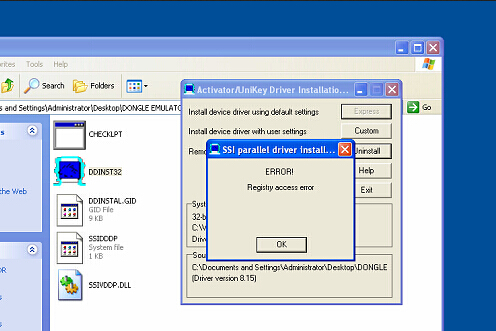
I installed the Tis2000 software on a VMware, my car is SAAB 2003, when I want to get the security code, the software show me a prompt “ ERROR! Registry access error” as following picture show. What’s the problem?
Answer:
The error shows the driver software of USBKEY has not been installed successfully on your computer. You should notice the driver software CAN NOT be installed on Virtual Machine.
Customer Feedback: I install the driver software again on a new computer with Win XP, it is installed smoothly. After the installation finished, the error never show again.
Question Two:
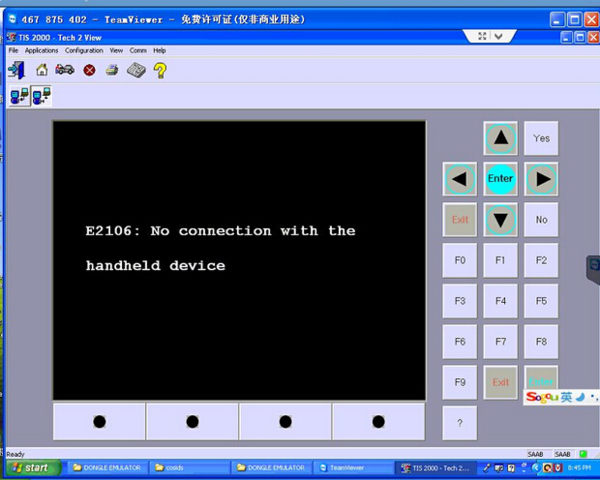
After I installed the software of GM tech2 on win xp, I want to program ECU for my SAAB. But there shows a error, it says ” E2106: No connection with the handheld device”. Here is the error picture:
Answer:
This error shows you did not connect your tech2 device with the computer. To solve this problem, you should connect your gm tech2 with computer by internet access. After they are connected, you can continue programming the ECU.
Customer Feedback: it is right. I connect the tech2 interface with computer by internet access, and i go on programming the ECU. All works fine now.
自訂分類:不分類
上一則: How to change the language for VDM UCANDAS to the one you want?下一則: SDP3 truck diagnostic tool for Scania error solution
你可能會有興趣的文章:
限會員,要發表迴響,請先登入


