Crop Function
-------------------------------------------------------------------------------------------------------
Why use the “Crop” function? When you do not want to expose some activities data, you can use this function.Or some activity records is redundant, you can also use this function.
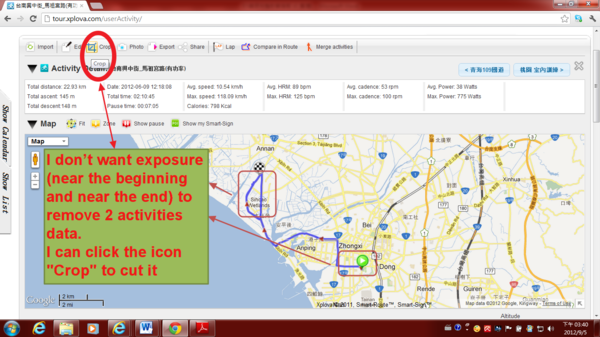
1)For example, I don’t want exposure (near the beginning and near the end) to remove 2 activities data, as shown
I can click the icon "Crop" to cut it.
2) The following image will appear
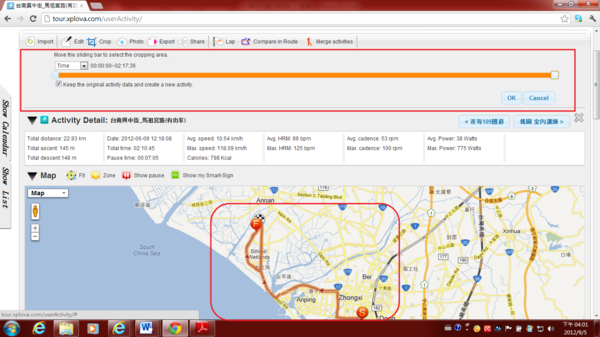
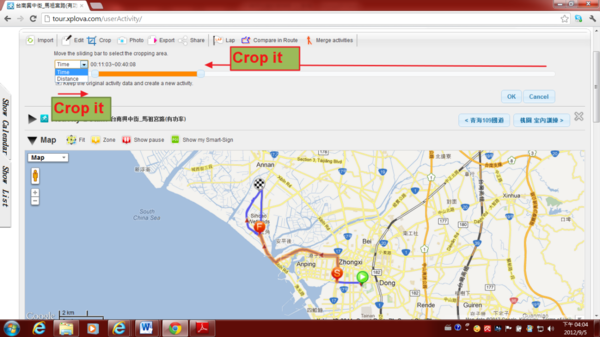
3) You can crop the activity area by Time, or by Distance, or by Record (R1, R2, R3...)
4) If you select "Keep the original activity and create a new activity",
then click "OK", it will keep the original activity and create a new activity.
If you don't select it, it will cover old one.
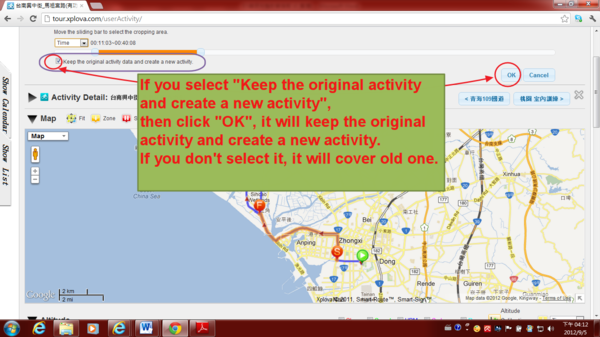
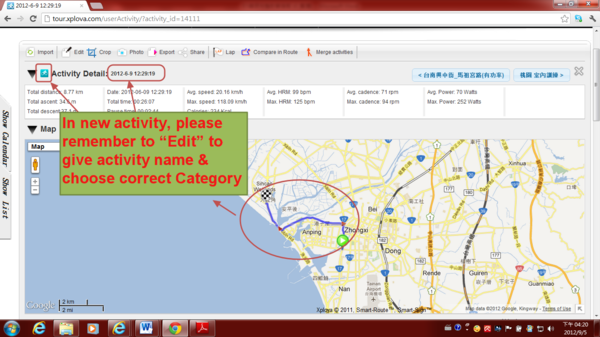
5) For example, It select "Keep the original activity and create a new activity", as shown. It will keep the original activity and create a new activity.
In new activity, please remember to “Edit” to give activity name & choose correct Category. Here no longer introduce the "Edit" function.
下一則: [Xplova E5 Lecture] Altitude Calibration
限會員,要發表迴響,請先登入


