The Huawei Mate20’s back cover is hard crystal material. It is easy to break if we crashed the phone unconsciously while using it. We will need to replace the back housing if it is crushed and broken. Here Etrade Supply shows you how to replace your Huawei Mate20 back cover yourself at home in simple steps.
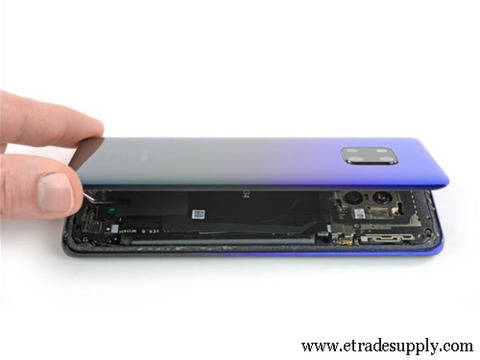
Always turn off the device as the first step. Eject and take out the SIM card tray. Use hot air gun to blow on the back cover with 80℃ for 2-3 minutes. Afterward, use suction cup to pull the back cover. Hard plastic plectrum to insert the gap and slice around the Huawei Mate20 Pro back cover. Gently pry and flip it over to take it off from the phone. Clear the reminding adhesive sticker on the frame with tweezers after the broken back cover is removed. Apply a new Huawei Mate20 Pro adhesive sticker on the new back cover, place the new cover onto the phone and make sure it is in the exact position. Slightly press the cover around the edge to make sure it is closely sealed up. Insert the SIM card tray back. Turn on the phone, the whole process is finished.
The whole procedure is simple, but we need to be careful and patient. You may also go to the repair shop if you are not confident about yourself. There are lots of low-quality high copy Huawei back covers in the market, just be careful with it. You may come to Etrade Supply if you are looking for a new rear cover for your Huawei phone. We offer other Huawei Mate series parts such as Huawei Mate20 LCD screen and digitizer. Just contact us if you are interested.
下一則: Huawei Nova 3 Disassembly Teardown – What Components are Inside?
- Huawei Nova 3 Disassembly Teardown – What Components are Inside?
- Huawei P50 Series will be Arriving in 2021
- Teardown Steps Presentation on iPhone 12
- How to Replace the iPad Air 3 Headphone Jack and Flex Cable Ribbon
- 5 Most Important Things You Should Care About on iPhone Repair
- Why is Digital Thermometer Better than Mercury Thermometer?


