The iPhone 12 has been launched on the
global market this October. This new iPhone model has become the most hot sale
smartphone model this year. Since we can see the differences of this new model
on the appearance, we are still curious about the inside parts and structure of
iPhone 12. This is the teardown steps we would like to present here. Besides,
we will share you tips about iPhone 12 teardown and repair on the following,
hope you would be interested if you know iPhone repair.
1. Tear down and separate the iPhone 12 display screen
Power off the iPhone, eject and take out the SIM card firstly. Unbolt the two pentalobe screws on the bottom. Use hot air gun to blow on the display edge and corners, then use suction cup to pull the display out. Use hard plastic plectrum to slice and separate the display screen. Flip over the display, loosen the Phillips screws and remove the metal shield for fixing the display flex cables. Disconnect the flex cables so that we can totally take off the display screen.
2. Tear down the iPhone 12 inner small parts
Loosen the screws and remove the metal shield for fixing the rear-facing cameras. Disconnect and take off the rear cameras. Unbolt the screws and take off the plastic panel beside the cameras. Loosen the screws and take down the loudspeaker with flex cable, then the iPhone SIM card reader. Screw off and take down the iPhone taptic engine. Disconnect the front-facing cameras and then take off the camera module with spudger.
3. Tear down the iPhone 12 battery and logic board
Since the logic board flex is connected closely beside the battery,
here we can unbolt the screws for fixing the logic board. Use spudger to pry
and take off the logic board from the back housing, and leave the flex cables
connected. Tear off and pull out the battery adhesive sticker beneath the
battery with tweezers carefully, then we can take down the iPhone
battery from the back housing. Loosen the screws and remove the metal panel
for fixing the logic board flex, then take off the logic board entirely.
As final tips about iPhone 12 teardown
process, the iPhone logic board flex has two branches of flex cables, which is
closely connected on the side of the battery. To take off the logic board, we
need to take down the battery beforehand. The iPhone
wireless charging coil is closely stick on the back housing, it is no need
to take further teardown process on it. The iPhone 12 small parts and the
components are tiny, we need to be careful on classification, don’t mess them
up or miss any of them.
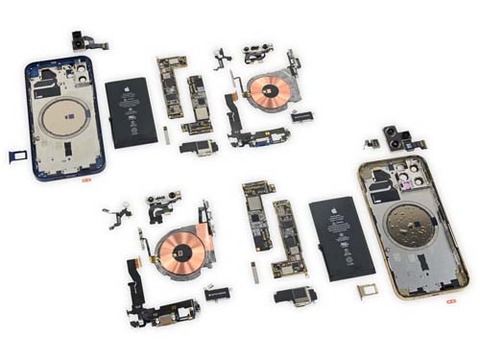
Specific demonstration about iPhone 12 teardown refers to Etrade Supply blog: Full Process Presentation on iPhone 12 Teardown
下一則: How to Change an iPhone 11 to iPhone 12 by Replacing the Back Housing
- Why the iPhone Aftermarket Screens From China Have Touch Issues?
- Why My iPad Home Button Was Falling in After Repaired?
- What Cause the iPad LCD Screen Backlight dim and How to Fix it
- How to replace the iPad Pro 10.5 Charging Port with flex cable
- Easy Way to Replace the Huawei Mate20 Pro Back Cover
- Huawei Nova 3 Disassembly Teardown – What Components are Inside?


