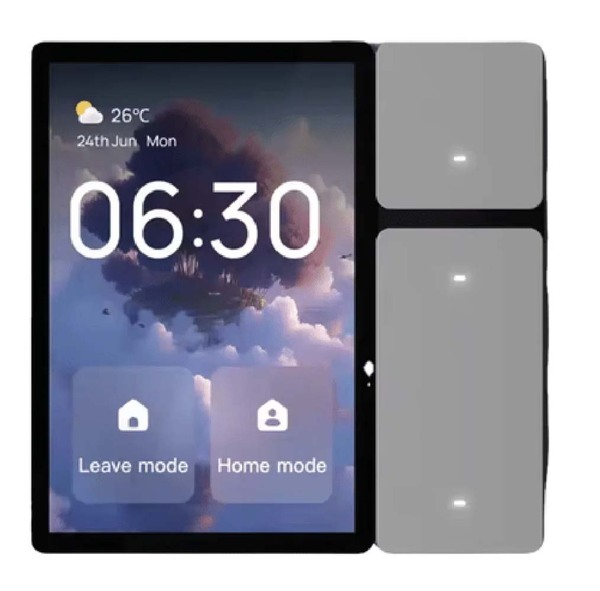
For this type of product, a PX30 SBC can be a practical embedded hardware platform. Based on the Rockchip PX30 processor, a PX30 single-board computer can run Linux or Android, drive a TFT LCD, support capacitive touch, connect to Wi-Fi or Ethernet, communicate with external control modules, and provide a stable foundation for wall-mounted smart home terminals.
Compared with a basic microcontroller design, a PX30 SBC provides stronger software capability, better graphical interface support, and more flexible connectivity. Compared with a larger industrial PC, it is smaller, lower in power consumption, and more suitable for compact home automation products. This makes it useful for smart control panels, indoor HMI terminals, building automation panels, IoT gateways, and customized home control devices.
What Is a PX30 SBC?
A PX30 SBC is a single-board computer built around the Rockchip PX30 SoC. The board usually integrates the PX30 processor, DDR memory, eMMC storage, power management, display interface, touch interface, USB, Ethernet, UART, GPIO, I2C, SPI, audio, and wireless communication options depending on the board design.
PX30 is designed for low-power embedded applications. It is not a high-end AI processor, but it is well suited for control panels and connected devices that need a graphical interface, stable Linux or Android operation, and common embedded interfaces.
In a smart home product, the PX30 SBC can serve as the main control and user-interface board. It can run the application, display the UI, process touch input, connect to local networks, communicate with control modules, store configuration data, and support remote updates.
Why PX30 Fits Smart Home Control Panels
Smart home panels need to be compact, responsive, reliable, and visually modern. The device is often installed on a wall, similar to a traditional switch panel or thermostat. Users expect it to wake quickly, respond smoothly to touch, display clear information, and remain stable for long-term daily use.
PX30 is suitable because it offers enough performance for a touch-based interface while keeping power consumption under control. It can support embedded Linux or Android systems, which gives product teams flexibility in software development.
If the product needs a polished app-like user interface, Android can be used. If the product needs a lightweight, controlled, and faster-booting system, Linux with Buildroot or Yocto can be a good choice. This flexibility allows the same hardware platform to support different product positioning and software strategies.
For smart home devices, cost is also important. A PX30 SBC can provide a good balance between computing capability and hardware cost, especially for control panels that do not require high-end video processing or heavy AI inference.
Typical Smart Home Applications
A PX30 SBC can be used in many smart home and building automation products.
One common application is a wall-mounted smart control panel. This device can replace or extend traditional switch panels. It may control lighting, curtains, air conditioning, heating, ventilation, security modes, and scene presets. A 4 inch, 5 inch, 7 inch, or 10.1 inch TFT display with capacitive touch can provide a clear and modern user experience.
Another application is a home automation gateway with a local display. The PX30 SBC can connect to cloud services, mobile apps, and local devices. It may communicate with external modules supporting Wi-Fi, Bluetooth, Zigbee, Matter, KNX, RS485, or other protocols depending on system design.
PX30 can also be used in indoor intercom panels, access control terminals, HVAC controllers, room control panels for hotels, apartment automation devices, smart appliance interfaces, and energy monitoring panels.
In these products, the user interface is not just decoration. It directly affects usability. Users need clear status icons, fast touch response, simple settings, and reliable control feedback.
Display and Touch Integration
The display is one of the most important parts of a smart home panel. Since the product is installed in a visible location, the display quality and front appearance strongly affect the perceived value of the device.
A PX30 SBC can be designed to support TFT LCDs through interfaces such as RGB, MIPI DSI, LVDS, or HDMI depending on the board design. For compact wall panels, MIPI DSI or RGB may be used. For larger panels, LVDS or HDMI may be more practical.
Common smart home panel display sizes include 4 inch, 5 inch, 7 inch, and 10.1 inch. Smaller screens are suitable for room controllers and switch-panel replacements. Larger screens are useful for central control panels with more functions, device lists, camera previews, and scene controls.
Capacitive touch is usually preferred for smart home products because users expect a smartphone-like experience. Touch integration requires correct driver support, I2C or USB communication, interrupt configuration, reset control, coordinate mapping, and screen rotation handling.
Cover glass design also matters. A full-flat glass front can make the product look more modern and easier to clean. Optical bonding may improve display clarity and make the front structure feel more premium, although it also increases cost.
Operating System Choices: Android or Linux
A PX30 SBC can support Android or Linux depending on the software requirements.
Android is a good choice when the smart home panel needs a rich graphical interface, app-style development, multimedia support, smooth animations, Wi-Fi setup pages, and cloud-connected user experiences. Many software teams are familiar with Android development, which can reduce application development time.
However, an Android smart home panel should be customized as a dedicated device. It should not behave like a normal tablet. The system may need a custom boot logo, auto-start application, hidden navigation bar, disabled status bar, restricted settings access, kiosk mode, and OTA update support.
Linux is a good choice when the product needs a lightweight system, fast boot, direct hardware control, stable background services, and a more controlled software stack. With Buildroot or Yocto, engineers can build a compact Linux firmware image that includes only the required packages.
A Linux-based smart panel may use Qt, LVGL, GTK, Weston, or a browser-based UI. The best choice depends on the UI complexity, boot-time target, memory usage, development team experience, and long-term maintenance strategy.
Communication with Smart Home Devices
A smart home panel rarely works alone. It needs to communicate with lights, switches, thermostats, sensors, curtains, locks, cameras, audio systems, and cloud platforms.
A PX30 SBC can provide several communication paths. Ethernet can be used for stable wired networking. Wi-Fi is useful for wall-mounted products where network cables may not be available. Bluetooth can support pairing, local setup, or communication with nearby accessories.
For building automation or industrial-style smart home systems, UART, RS485, CAN, I2C, SPI, or GPIO may be used to connect external modules. For example, a separate communication board may provide KNX, Zigbee, Matter, Thread, or other protocol support, while the PX30 SBC handles the user interface and system logic.
In some designs, the PX30 board works as a local control terminal while the actual device control is handled by a gateway or cloud platform. In other designs, the PX30 SBC itself may act as the gateway, coordinating communication between local devices and remote services.
Network reliability is important. The system should recover automatically after Wi-Fi disconnection, router restart, DHCP failure, or temporary cloud service interruption. A smart home product should not require frequent manual rebooting.
User Interface Design for Smart Home Panels
The user interface of a smart home panel should be simple, fast, and easy to understand. Users do not want to search through complicated menus just to turn on a light or adjust temperature.
A good UI usually includes clear icons, large touch areas, readable text, logical grouping of devices, quick scene buttons, status feedback, and simple navigation. Common functions may include home mode, away mode, sleep mode, lighting control, curtain control, air conditioning control, security status, room temperature, humidity, and energy usage.
PX30 provides enough performance for this type of interface when the graphics framework is chosen carefully. For a simple UI, LVGL or a lightweight Linux application may be sufficient. For a more animated and app-like experience, Android or Qt can be used.
The UI should also be designed for long-term stability. Continuous animations, heavy background processes, large image resources, and excessive logging can affect performance over time. Smart home panels often stay powered on every day, so software efficiency matters.
Audio, Voice, and Multimedia Support
Some smart home control panels need audio output or voice-related features. The device may play notification sounds, doorbell alerts, alarm tones, voice prompts, or intercom audio.
A PX30 SBC can be designed with audio codec support, speaker output, microphone input, or USB audio depending on the product. For indoor panels, speaker quality and microphone placement should be considered together with the enclosure design.
If the product supports video intercom or camera preview, the software must handle video decoding and display performance carefully. PX30 can support lightweight multimedia applications, but the system should be designed according to actual resolution, frame rate, and codec requirements.
For advanced voice recognition or AI assistant features, developers should evaluate whether local processing is required or whether cloud-based services will be used. PX30 is suitable for basic audio and interface functions, but heavy AI workloads may require additional processing resources.
Power Design for Wall-Mounted Devices
Smart home panels are often installed in wall boxes or fixed positions. Power design must match the installation environment.
Some products may use DC input, such as 12V or 24V. Others may use PoE, USB-C power, or a custom power module. If the device replaces a traditional wall switch, the power environment may be more constrained and require special design.
The total power budget includes the PX30 SBC, display backlight, touch panel, Wi-Fi module, speaker, sensors, and any external communication modules. The display backlight can be a significant power consumer, especially for larger panels or higher brightness screens.
Power stability is essential. Voltage drop, surge, electrical noise, or unstable adapters can cause system reboot, touch problems, Wi-Fi issues, or storage corruption. Protection and filtering should be designed carefully.
Thermal Design and Enclosure Considerations
Thermal design is important for wall-mounted smart home products. These devices are often installed in compact plastic or metal housings with limited airflow. Heat from the processor, power circuits, Wi-Fi module, and display backlight can accumulate inside the enclosure.
PX30 is relatively power-efficient, but the final thermal performance depends on the complete product design. Engineers should test the device inside the real enclosure with the display on, Wi-Fi active, application running, and communication modules working.
The enclosure should provide enough internal space for heat spreading. Metal frames, thermal pads, copper areas, and controlled backlight brightness can help reduce temperature. If the product uses a white or glass front panel, the appearance should be balanced with thermal and assembly needs.
A smart home panel should remain comfortable to touch. Users may notice if the front glass or housing becomes too warm. Thermal design is therefore both a reliability issue and a user-experience issue.
Mechanical Design and Installation
Smart home panels must fit into the installation environment. In many markets, wall boxes, switch standards, and mounting methods differ. The SBC should be smaller than the display area and arranged to allow a thin and clean enclosure.
The mechanical structure should support the LCD, touch panel, cover glass, SBC, power board, speaker, microphone, antenna, and connectors. Cable routing should avoid pressure on the LCD and avoid interference with antennas or touch signals.
For wall-mounted products, thickness is often a key design target. Users prefer a modern, slim appearance. However, the device still needs enough space for heat dissipation, cable bending, mounting screws, and reliable assembly.
A modular structure can help. For example, the display and touch module can form the front assembly, while the PX30 SBC and power board are mounted behind it. This allows easier production testing and maintenance.
Reliability for Daily Use
A smart home control panel is expected to work every day without user maintenance. Reliability must be designed into the software and hardware.
The system should boot automatically after power loss and return to the main control interface. If the application crashes, it should restart automatically. If the network disconnects, the device should reconnect without manual intervention.
Storage management is also important. Logs, cache files, update packages, and temporary files should not fill the eMMC over time. If the device supports OTA updates, the update process should handle failure and recovery safely.
Watchdog support is useful for long-running products. A hardware watchdog can reset the system if it becomes unresponsive. Software services should be monitored and restarted when necessary.
Long-term testing should include power cycling, continuous UI operation, Wi-Fi reconnection, touch testing, display aging, storage write testing, and temperature testing.
Security and Privacy
Smart home devices are connected products, so security should not be ignored. A wall-mounted control panel may have access to door locks, cameras, lighting, HVAC, security modes, and user schedules. Unauthorized access could affect both privacy and safety.
The system should disable unnecessary services, restrict debug ports, protect user settings, secure network communication, and verify update packages. Default passwords should not remain in production firmware.
If the device stores user data, Wi-Fi credentials, cloud tokens, or local control permissions, these should be protected. Remote access should require authentication. OTA updates should be signed or verified to prevent unauthorized firmware modification.
Security design should be included from the beginning. It is much harder to add proper protection after the product is already deployed.
Production and Customization
A PX30 SBC used in smart home products should be designed for production, not only for prototyping. Product teams should consider firmware flashing, factory testing, MAC address programming, serial number management, aging tests, and version control.
Customization may include display size, cover glass design, touch panel tuning, housing color, mounting structure, speaker position, logo printing, operating system customization, boot animation, and application auto-start.
For smart home products, appearance matters more than in many industrial devices. The front glass, screen brightness, UI style, housing material, and wall-mounted thickness all affect customer acceptance.
Long-term supply is also important. Smart home products may remain in a product line for years. The SBC, LCD, touch panel, wireless module, and mechanical parts should have stable supply and controlled revisions.
How to Choose a PX30 SBC for Smart Home Projects
When selecting a PX30 SBC for smart home applications, engineers should begin with the full product requirement rather than only the processor model.
Important factors include display interface, touch panel support, Android or Linux BSP quality, RAM size, eMMC capacity, Wi-Fi and Ethernet support, audio interface, GPIO and UART expansion, power input, mechanical size, thermal behavior, operating temperature, OTA update support, security customization, and long-term availability.
Vendor support is also important. A smart home panel often requires display debugging, touch tuning, system customization, driver adaptation, and production test support. A board with good documentation and stable BSP support can reduce project risk.
Before mass production, the PX30 SBC should be tested with the actual display, touch panel, enclosure, power supply, wireless environment, and application software. Testing only the development board is not enough.
Conclusion
A PX30 SBC is a practical platform for smart home control panels and connected indoor devices. It offers enough computing performance for a modern touch interface while keeping power consumption and system cost under control.
With Linux or Android support, PX30 can be used in wall-mounted control panels, room controllers, smart gateways, intercom terminals, HVAC controllers, access panels, and energy monitoring devices. It can drive TFT displays, process touch input, connect to networks, communicate with external modules, and run dedicated applications.
A successful PX30 smart home product requires careful planning of display integration, touch performance, operating system, communication interfaces, power design, thermal structure, enclosure design, software reliability, security, and production testing.
The best smart home panel is not simply the one with the fastest processor or largest screen. It is the product where hardware, software, display, touch panel, enclosure, and user experience are designed together. When used properly, a PX30 SBC can provide a stable and cost-effective foundation for modern smart home applications.
限會員,要發表迴響,請先登入


