Solved! MB Star 2020.06 EPC.net error “application blocked by Java Security”
2020/09/24 11:54
瀏覽149
迴響0
推薦0
引用0
When opening EPC.net and may get error “application blocked by Java Security” on SD connect c4 / c5 (Item No. SP100-E1 SP100-B, SP255, SP255-E).
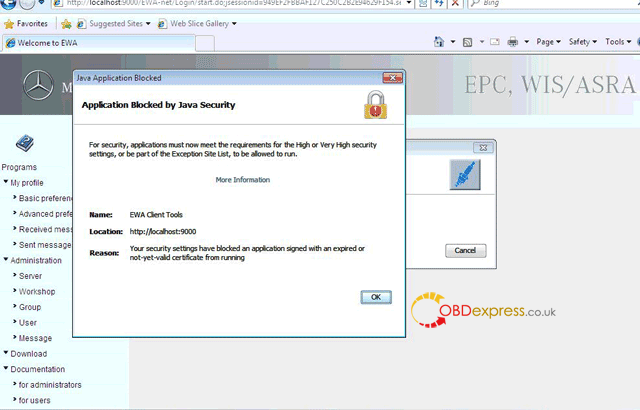
Please do like this:
Go to Computer -> Start -> Control Panel -> Java -> Security -> In Exception Site List, copy and paste the following 3 links of EWA.
http://localhost:9000/
http://localhost:9000/EWA-net/Login/
http://localhost:9000/EWA-net/Login/start.do;jsessionid=09830CCA323DC5E3C3E9FB9A2EC1B32B.server1
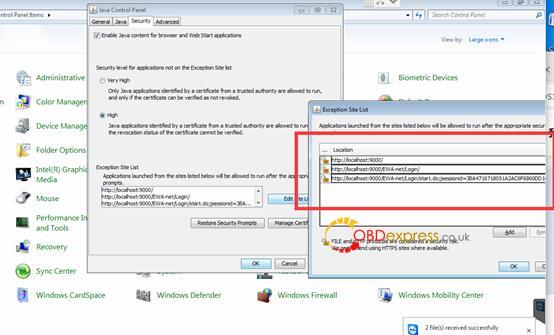
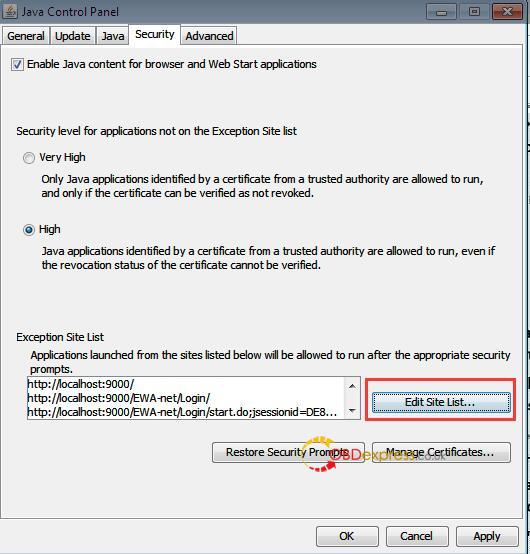
One more question: which MB Star may have this error that I will notice?
Answer: if you got from obdexpress.co.uk, that is any of
Buddies, MB Star EPC.net error “application blocked by Java Security” has working solution now, thanks to obdexpress.co.uk engineer.
Good luck!
自訂分類:不分類
上一則: BENZ Diagnostic Tool Comparison: Super MB Pro M6 vs. C4 vs. C6下一則: Tips to update SD Connect C4 firmware no batteries
你可能會有興趣的文章:
- Tips to update SD Connect C4 firmware no batteries
- How to use Vident iEasy310 scan Toyota Camry
- Clone Xentry Connect C5- Good & Bad Things
- VVDI MB TOOL V3.6.0 upate&software free download(23/12/2017)
- 12.2017 XDOSXentryOpenShell download for SDconnect, Xentry Connect C5
- (SOLVED) SDConnect C4 WiFi on Windows 10
限會員,要發表迴響,請先登入


