MB Star Diagnosis Coding Out ABC on Mercedes R230 Cars
2017/05/30 17:00
瀏覽146
迴響0
推薦0
引用0
MB Star diagnosis DAS software can code out ABC, here is the example on code out Mercedes SL65.
NOTE : the instruction here only for R230s (not any W215, W216, W220, W221)
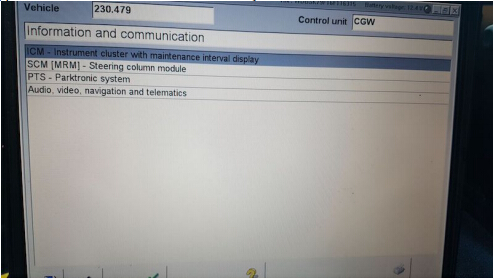
To do this, you need a MB Star diagnostic SD Connect C4 with Developer mode. Hook up SD Connect diagnostic system to your car and when it reads your car, select Control Units, pick Information and Communication and you will see ICM :
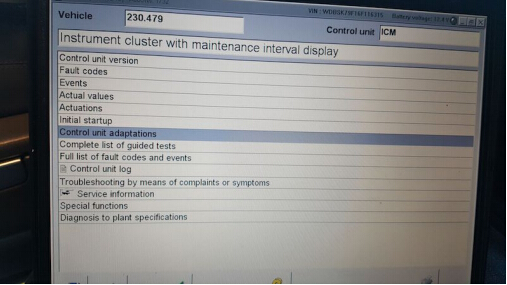
After ICM, you will see Control Unit Adaptions :
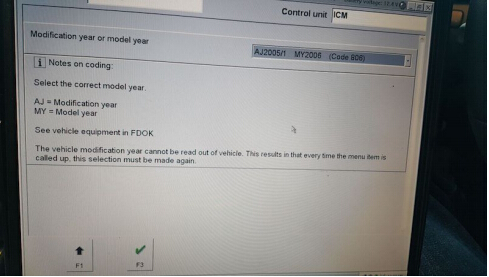
From there, choose the year of your model :
From there, select Special Equipment

Select ABC :
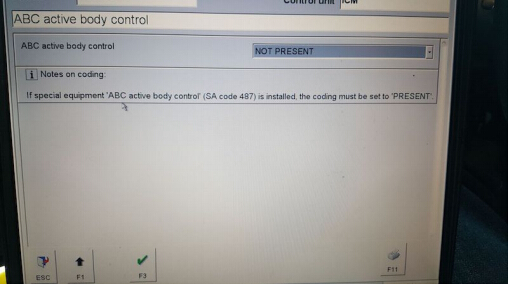
• Then go to the drop down tab and change it from PRESENT to NOT PRESENT, and click F3.
• After that, turn off the car, with the doors closed.
• Wait 1-2 mins and start the car back up (no more ABC codes and no white or red lights).
自訂分類:不分類
上一則: How to wired connect SD connect C4 to PC via LAN cable下一則: SDconnect C4 Xentry on Mercedes 205 “Files missing”
你可能會有興趣的文章:
- BENZ Diagnostic Tool Comparison: Super MB Pro M6 vs. C4 vs. C6
- Tips to update SD Connect C4 firmware no batteries
- Vident iAuto700 No Software and White Screen Solution
- How to use Vident iEasy310 scan Toyota Camry
- Four-System Scanners: Vident iLink440 vs. Foxwell NT414 vs. MD802 vs. CRP129
- Clone Xentry Connect C5- Good & Bad Things
限會員,要發表迴響,請先登入


