Each Mb star diagnosis DoIP Xentry Connect C5 host comes with a built-in hard drive (green board in picture below) which contains the data that makes the machine run properly. The hard drive is used to reflash/update C5 firmware as well.
1. Support wireless diagosis
8. Multi-Language available: English/Bulgarian/Danish/Greek/Spanish/French/Italian/Korean/Polish/Romanuan/Serbo-Croatian/ Turkish/Czech/German/Finish/Hyngarian/Japanese/Dutch/Portuguese/Russian/Swedish/Chinese
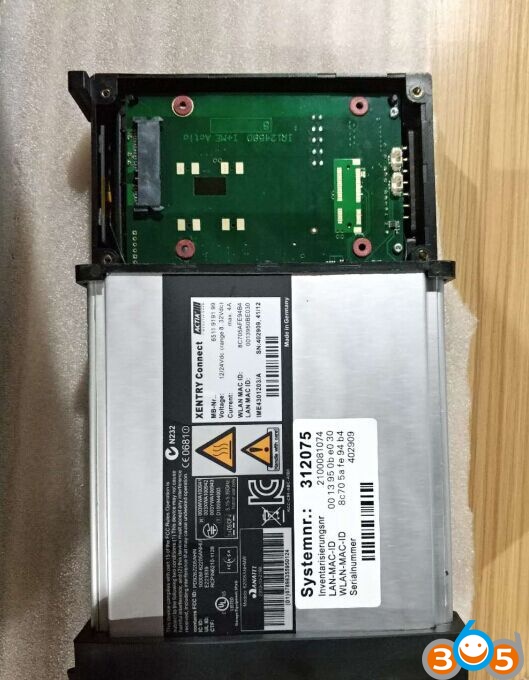
Recently come customers are attempt to remove hard drive on Xentry SDConnect C5 host by themselves and change data on computer, we sincerely warn our customers don’t do that.
Please don’t move the hard drive on SD Connect C5 host. Don’t connect the hard drive to computer to change data. You are at your risk. We are not hold the responsibility of your damage.
You need to send back the hard drive to factory to run firmware upgrade. If the factory provides the firmware upgrade link or online resources, you don’t need to send it back.
By the way, the movable external hard drive (software HDD) in the package contains Xentry Openshell XDOS, and engineering software Vediamo, DTS Monaco etc, it is the correct hard drive you can run on computer.
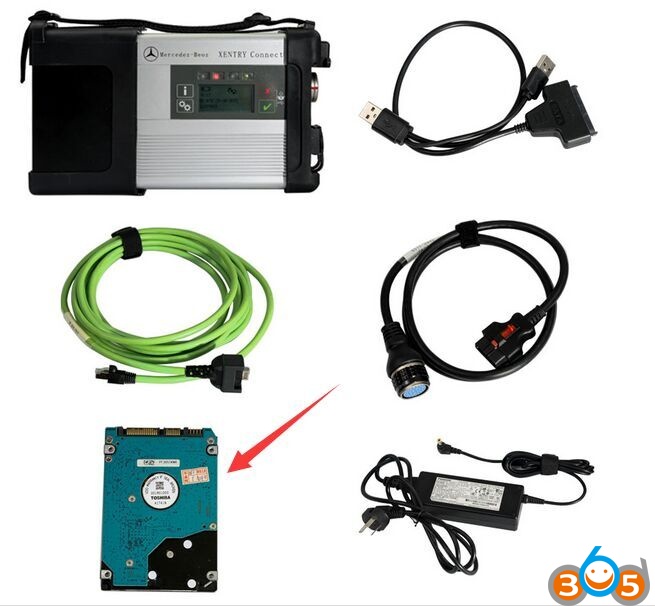
And don’t insert the software HDD to C5 host to replace original hard drive. It will cause damage to the xentry connect c5 multiplexer.
http://www.fobdii.com/category-15-MB-Star-Diagnostic-Tools.html
下一則: Update Software V1.110.1 Tango Key Programmer
- Wie man ABS-Bremssysteme durch gm tech2 entlüftet
- Buick Regal Automatic Air Conditioner Control Einstellung Problem
- Wie funktioniert der GM Tech2 am Chevrolet C5?
- How To Used MB Star C4 to program Mercedes-Benz DRL
- Reviews For Super SBB2 OBD Full Immo Dash TPMS EPS Scanner
- How to read VW Pin code with Lonsdor K518, Xtool X100 Pad2 and VVDI2
限會員,要發表迴響,請先登入


