Fixed!VXDIAG MULTI V1.8.0.0 Update Issue” Errorcode0″
2020/08/20 14:27
瀏覽43
迴響0
推薦0
引用0
Purpose:To solve VXDAIG VCX -PLUS update to V1.8.0.0 issue “update licenseFailed,Retry! Error code:0”
Question: I have updated my multi media unit’s firmware to V1.8.0.0.
The update process completed successfully but it is unable to retrieve existing licenses.
Please see the attached image displaying my serial number and error message.
After updating the firmware successfully.
All my existing licenses are gone .
And when i click update licenses it give error 0.
The update process completed successfully but it is unable to retrieve existing licenses.
Please see the attached image displaying my serial number and error message.
After updating the firmware successfully.
All my existing licenses are gone .
And when i click update licenses it give error 0.
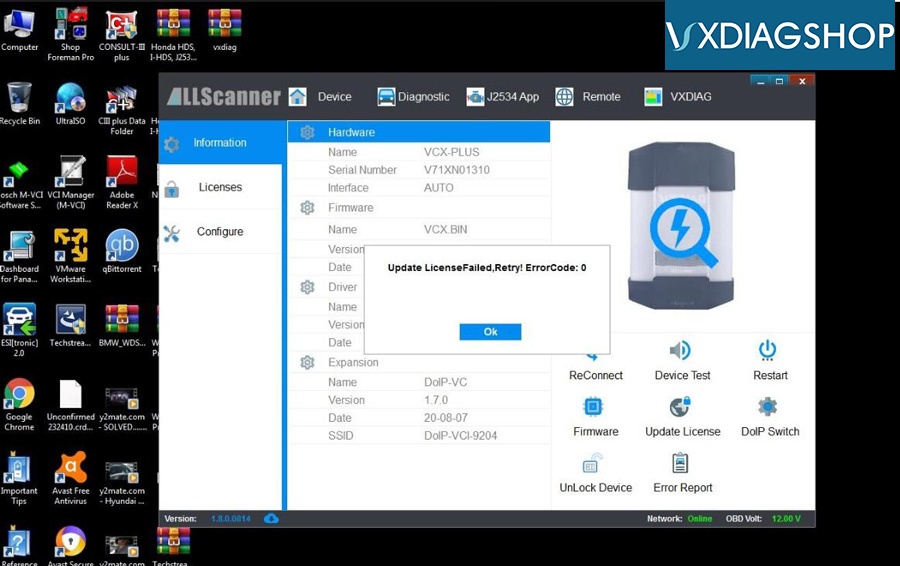
Solution from VXdiaghop technician:
1- uninstall all old version of VXmanager V1-6
2- Installed new version VXmanager V1-8
2- Installed new version VXmanager V1-8
Customer Feedback :
with few fails and retry during firmware update, now is ok
I have attached the new v1-8 license info
I have attached the new v1-8 license info
Thank you
自訂分類:不分類
上一則: Solution to BMW 535i 2009 DME cannot read ISN下一則: How to Fix VXIDIAG NANO GM Cannot Program Seat Module
你可能會有興趣的文章:
- Renew/clone EIS on w906 with VVDI MB BGA
- Autel MaxiIM IM508 Key Programmer Reviews in 2020
- Launch Thinkcar Pro professional OBD2 scanner: every car owner needs
- Launch Thinkdiag vs ThinkCar 2 vs Thinkcar Pro
- VCX Nano GDS2 not run after updating VXManager 1.8.0
- How to Fix VXIDIAG NANO GM Cannot Program Seat Module
限會員,要發表迴響,請先登入



