[夏肇毅知識運算網 Mark Hsia's Knowledge Computing Web]
如何在OpenERP軟體Odoo上新增客製化模組
2016-04-28
How To Create a New Module on the Odoo
如果我們要在Odoo上新增一個模組, 我們可以用以下命令來產生骨架:
If we are trying to build a new module of the Odoo, we should type the command like:
python odoo.py scaffold Academy openerp/my-modules
This command generates the Odoo module scaffold named Academy to the directory openerp/my-modules. But when we try to install this new Academy module under the Setting page, we cannot find an Academy module for us to install.
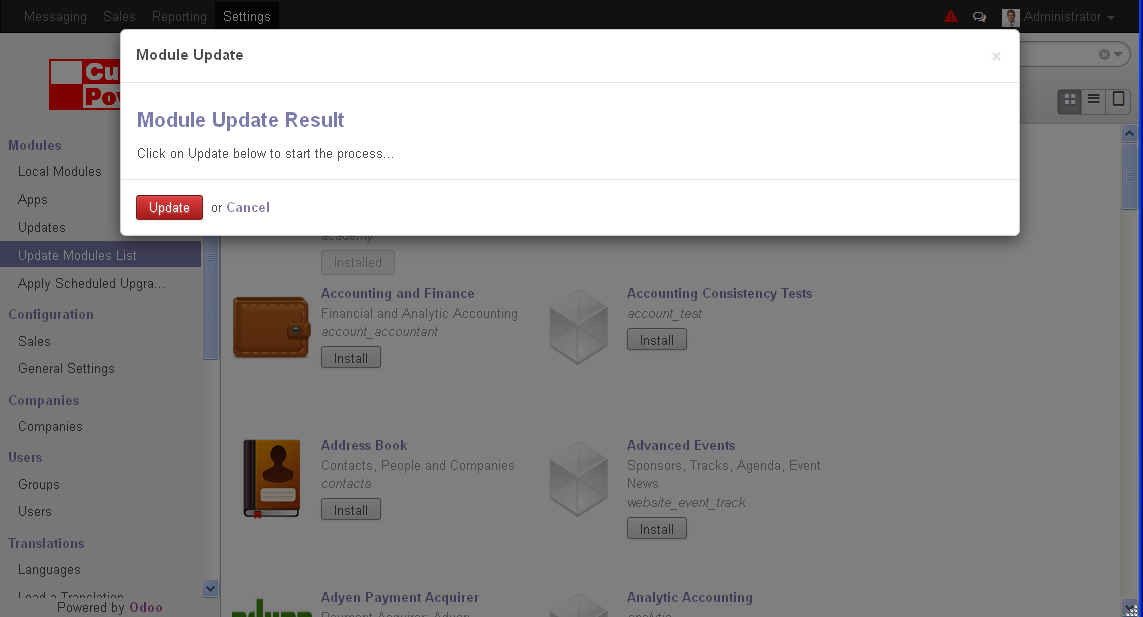
為了找到這新增模組, 我們必須在Modules用"Update Module List"選項.
In order to find this new module, we need to use the "Update Module List" option.
如果我們也找不到"Update Module List",那我們就要到使用者內選取"Technical Features" 選項.
If we can't find the option "Update Module List" either, we need to enable the "Technical Features" checkbox in our current user's settings.
Need to do some steps:
First, select side menu Users-Users and click the Administration user. Then we can see the form view of the User/Administrator. Click the "Technical Features" checkbox and save the settings.

Then, select side menu of Modules-"Update Module List", and click the Update button.

Building a Website — odoo 8.0 documentation
下一則: 夏肇毅知識運算網-在銷售將機會轉為報價階段的Odoo免費OpenERP系統
限會員,要發表迴響,請先登入