1. Teardown iPhone 11 Pro display screen
First of all, we need to get a new speaker and the repair tools ready. Power off the device and loosen the two pentalobe screws on the bottom. Hot air gun blowing on the edge of the screen for easy separation. Use a suction cup and hard plastic plectrum to separate the iPhone 11 display screen. Pry and flip the display aside, loosen the two Y-type screws and remove the small metal panel as well, then the six Y-type screws and the penal. We need to disconnect the display screen flex cables and the battery cable so that we could separate the display screen from the phone. After that, we would move to the next step.
2. Replace iPhone 11 Pro Speaker
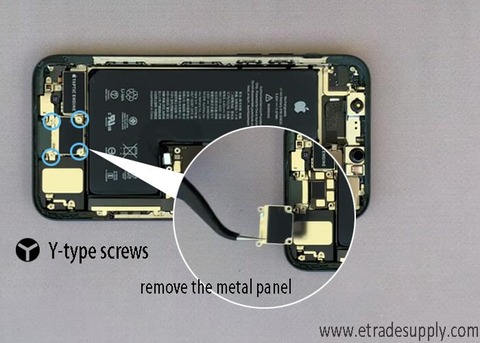
The speaker is on the bottom part of the iPhone. Firstly, we need to loosen the four Y-type screws and remove the metal panel. Disconnect the speaker flex cables and another battery cable. Loosen the three screws for fixing the speaker, for two Phillips screws and one Sandoff screw. Use hot air gun to blow the speaker on 80 ℃ for easy removable, then we can take down the speaker with tweezers. Install the new speaker on the phone and adjust it to the right position. Tighten the three screws back. Connect the flex cables and cover the pane back. Tighten the four screws for fixing the penal.
3. Reassemble iPhone 11 Pro display screen
The whole procedure may be a little complicated, we suggest you go to the repair shop if you are not familiar with iPhone repair. Besides, we offer all replacement parts for iPhone 11 models for sale. Just visit our shop on www.etradesupply.com or email to us if you have interests in our iPhone 11 Pro parts. You may leave your comments if have questions about our iPhone 11 repair process above.
下一則: 3 Reasons Why AMOLED Display Screen is better than LCD screen
- Why the iPhone Aftermarket Screens From China Have Touch Issues?
- Why My iPad Home Button Was Falling in After Repaired?
- What Cause the iPad LCD Screen Backlight dim and How to Fix it
- How to replace the iPad Pro 10.5 Charging Port with flex cable
- Easy Way to Replace the Huawei Mate20 Pro Back Cover
- Huawei Nova 3 Disassembly Teardown – What Components are Inside?
限會員,要發表迴響,請先登入


