21 CFR 101.9 Explained - The Rule Behind Every Row
21 CFR 101.9 is the FDA rule that says what a Nutrition Facts panel must contain and how it must be arranged. It governs the nutrient rows, their order, the serving size statement, the %DV column and the format rules, and it does not set the reference amounts behind serving sizes, which live in 21 CFR 101.12.
That split matters, because most label arguments are really two arguments wearing one coat. One is about content and layout, which 101.9 decides. The other is about how much food counts as a serving, which 101.12 decides. Mix them and you end up defending a serving size with a citation that never mentions it.
What 21 CFR 101.9 actually governs
Read the section as a specification for a table. It lists which nutrients must appear, the order they appear in, which rows indent under a parent, the units and the rounding, and the %DV column that pairs with each amount. It also pins the serving size statement at the top, in household units plus grams.
Then it covers format: type size and weight, the rules between blocks, the indents, and the layouts a producer may choose. Vertical, tabular, linear and simplified all sit inside that format section, along with the smaller type allowed for packages with little printable area. The parts that matter most for a label are the serving size statement, the nutrient content rules and the format section.
What it does not do is fill in your numbers. It will not tell you how much sodium is in your sauce, and it will not test your product for you.
Where the rest of the requirements live
| The question | Where it is answered | Why it sits apart |
|---|---|---|
| How much food is one serving? | 21 CFR 101.12 | Defines the reference amounts, called RACC, that serving sizes are built from |
| What does a Supplement Facts panel contain? | 21 CFR 101.36 | A separate panel with its own rows and rules |
| Where does the allergen statement go? | FALCPA, section 403(w) | A separate statute, not part of the panel rule |
| Which products are exempt? | 101.9(j) | An exemption clause inside the same section |
Two rows in that table get misattributed to 101.9 all the time. RACC is the bigger error, because serving size sits at the top of every panel and looks like panel content. The reference amount comes from 101.12, and 101.9 only tells you how to state the serving once you have one.
The row order is the rule, not a preference
Start at calories. Then total fat, with saturated fat and trans fat indented beneath it, then cholesterol and sodium. Total carbohydrate follows, with dietary fiber, total sugars and added sugars indented under it, then protein. Four micronutrients close the panel: vitamin D, calcium, iron and potassium, each with a %DV.
Every indent is doing work. Saturated fat indented under total fat tells the reader it is a subset rather than an addition, and added sugars indented under total sugars says the same. Slide a row out of position and the panel makes a structural claim you never intended, even when all the numbers are right.
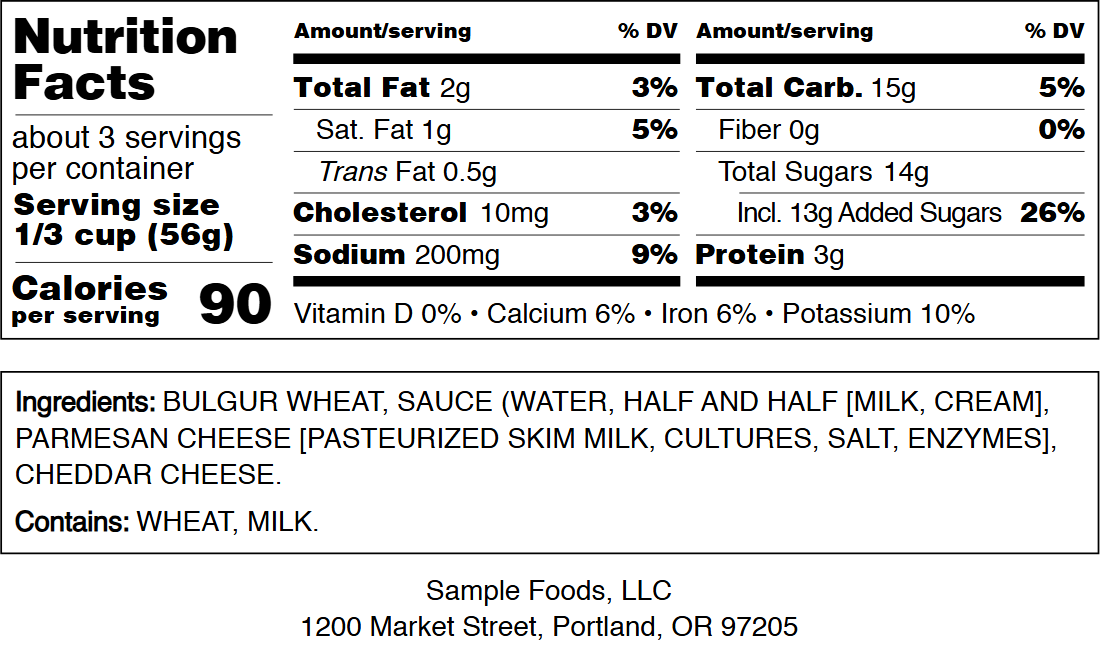 Wide layouts keep the same sequence, so the order survives even when the rows are split across two columns.
Four defects a reviewer spots in seconds
- A serving size with no gram weight beside the household measure.
- A %DV cell left empty on a nutrient that has a Daily Value.
- The footnote rewritten into brand voice, or dropped because it looked crowded.
- Trans fat deleted because the value is zero, when the row still belongs on the panel.
None of those are arithmetic errors. They are format errors, and they are the expensive kind, because anyone checking the label can see them from across a table without recalculating a thing.
What a formatting tool can and cannot settle
A tool draws the panel you describe. It does not know whether your sodium figure came from a lab, a supplier specification or a guess, and it will not check your serving size against 101.12. That is less a flaw in the tool than the edge of the job.
Respect the edge in both directions. Expect a label generator to run nutrition analysis and you get invented numbers inside a clean layout, which is worse than rough numbers inside an honest one. Expect a laboratory to fix your indents and you get a correct analysis that still fails at the printer.
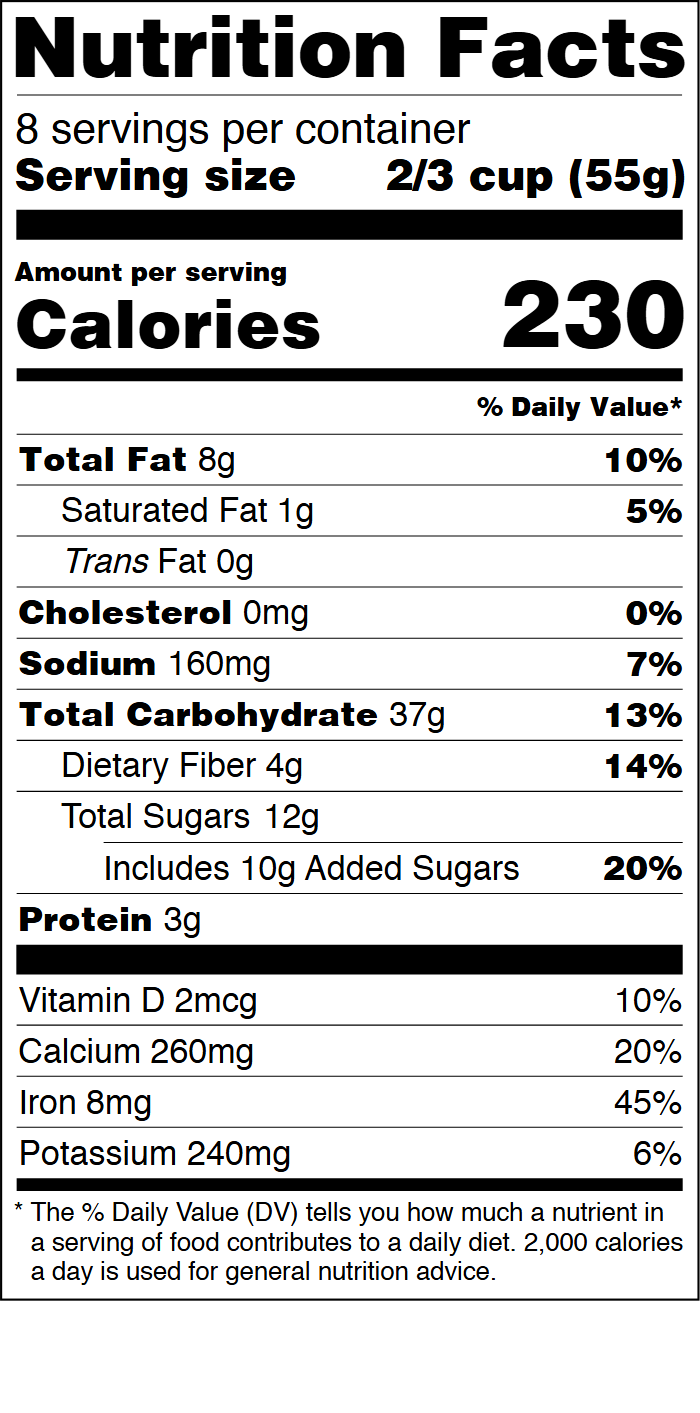 The tall format leaves room for the %DV footnote under the last mineral row, which is where a dropped note shows first.
Reading the rule without reading all of it
You do not need the whole section in your head. You need four answers from it: which rows are mandatory for your product, what order they take, how the serving statement reads, and what the format requires of the type. Those four cover almost every practical decision on a standard panel.
Keep the current text open in a tab while you build. The rule is amended, and a file built from a 2014 screenshot of the panel will reproduce 2014 mistakes, most visibly a missing added sugars row.
Frequently asked questions
Does 101.9 set serving sizes?
No. It tells you how to state a serving on the panel. The amount itself is built from a reference amount, and those reference amounts are defined in 21 CFR 101.12.
Does 101.9 apply to supplement labels?
No. Supplement Facts panels follow 21 CFR 101.36. The two panels share a visual language, which is why people assume one rule covers both, but the nutrient rows and the permitted statements differ.
Is the %DV footnote required?
The %DV column needs a stated basis, and the standard footnote names the 2,000 calorie reference diet. Use the wording the rule supplies rather than paraphrasing it, and keep it inside the panel border.
Can I use the simplified format?
The simplified format exists inside 101.9 and applies when most nutrients are present in insignificant amounts. Check the conditions in the current text before you drop rows, because the format is narrower than the phrase suggests.
The practical order is simple: settle the numbers, then set them into a panel whose rows already follow the sequence. A blank nutrition facts label template that keeps 101.9's row order saves you from the most common format defect, and you still check the finished file against the rule before it reaches a printer.
限會員,要發表迴響,請先登入


