
Having a great pen display tablet is always a good investment for an artist.
Wacom is a well-known brand in the world of digital art, but their Cintiq series pen display tablets can be quite expensive.
For the rest of us hobby artists, spending that much is just not in the cards.
Fortunately, there are some good cheap alternatives that offer the same quality and performance without breaking the bank.
What Drawing Tablet Brand Competes with Wacom?
There are a hand full of really good competitive brands out there, including Huion, XPPen, Xencelabs, Gaomon, Veikk, Ugee, etc.
They offer lots of features for a fraction of the Wacom price.
10 Good Cheap Wacom Cintiq Alternatives in 2026
Cintiq alternatives have evolved over the years. Below, I review my top 10 picks.
1. Veikk VK1200 V2

If you have ever wondered, Which is the cheapest display drawing tablet that you can get from a reputable tablet brand – the Veikk VK1200 V2 is the answer.
It has an 11.6-inch IPS screen with FHD 1920×1080 resolution and a 72% NTSC color coverage that gives you a clear, crisp image even in less-than-ideal lighting.
The fully-laminated screen is pretty accurate touch wise, and the pre-installed matte screen protector is nice to draw on.
The Included batty-free pen is responsive and precise with 8192 pressure levels and 60 degrees of tilt sensitivity.
There are 6 shortcut buttons located on the left side are programmable and can be set to any shortcut of your choice.
The new updated single-cable USB-C connection is particularly convenient for reducing desk clutter, which also improves portability.
You are getting a great value for money and making no compromises when getting the VEIKK VK1200 V2.
2. XPPen Artist 13.3 Pro V2

As the name suggests, the XPPen Artist 13.3 Pro V2 is a 13.3-inch display tablet. It may not be the cheapest tablet out there but it is definitely one of the best drawing tablets in its segment.
The screen is very sharp, vivid, and accurate with IPS LCD panel, FHD 1080p resolution and 90% Adobe RGB color gamut.
It also features a full-laminated screen with AG matte Film, reduces parallax and glare, bringing a paper-like feel.
It has 8 shortcut buttons along with a unique, red rotating dial that helps you perform advanced shortcuts such as zoom, pan, scroll, and changing the size of brush.
The Artist 13.3 Pro V2 comes with XPPens most advanced X3 Pro Stylus that has 16,384 levels of pressure sensitivity along with support for tilt recognition.
Depending on how you use this, it can work similar to a ballpoint pen, creating thin and accurate lines.
Despite the low price, The tablet comes with a lot of accessories such as a pen holder, pen nibs, drawing glove as well as a free tablet stand.
3. Huion Kamvas 13 (Gen 3)

For those looking for a simple and affordable alternative to the Wacom One 13 Touch display, the Huion Kamvas 13 (Gen 3) is highly rated amongst artists.
You can often find it for less than $230 and at that price this is a fantastic value. It even has 5 extra shortcut keys and 2 dials.
The 1080p FHD resolution is good for its 13.3-inch size. With a contrast ratio of 1000:1 and an sRGB color gamut coverage of 99%, Its IPS display is quite outstanding.
A matte AG etched glass surface is integrated into the fully laminated screen, helping to offer a natural and paper-like texture when you draw.
The battery-free stylus has a rubber grip and is comfortable to use, It has most advanced pen tech 4.0, with 16,384 levels of pressure sensitivity and tilt recognition so that you can create quite sophisticated work.
Final, Any artist can use the Huion Kamvas 13 (Gen 3) easily with Windows, Mac OS, and Android devices using a single USB-C cable.
4. XPPen Artist 16 (2nd gen)

The XPPen Artist 16 (2nd gen) is well-liked for its compact size of 15.4 inch, 10 Shortcut Keys and color options of green, blue or pink.
The laminated anti-glare IPS display itself is seriously impressive, with a 1920×1080 resolution, 1000:1 contrast ratio and 127% sRGB color gamut.
Put precision performance at your fingertips with X3 Elite stylus. It is battery-free and comes with low Initial activation force of 3g, 8192 pressure levels and tilt detection.
Aside from your Mac and Windows PC, it is also compatible with Chromebook and Android. But you need to buy the USB-C to USB-C cable separately.
For those who want to carry the tablet around, it is trimmed with rubber coating for protection from drops.
5. Ugee UE16

Ugee UE16 is the best budget 16-inch pen display out there, which is a great cheap alternative to Wacom Cintiq 16.
It has a concise and sleek design, offering a reasonably sized 15.4-inch drawing area. The full HD IPS screen with 94% Adobe RGB color gamut on the Ugee UE16 looks pretty vibrant and vivid.
It comes with an anti-glare film on the Laminated display that protects the screen well from scratches. There is very little parallax and just enough friction on the nib for a pencil-like experience.
The stylus is battery-free and has tilt response and 8192 levels of pressure sensitivity, which allows you to take control of the cursor and efficiently and effectively create an eye-popping design.
6. Huion Kamvas Pro 16 (2.5K)
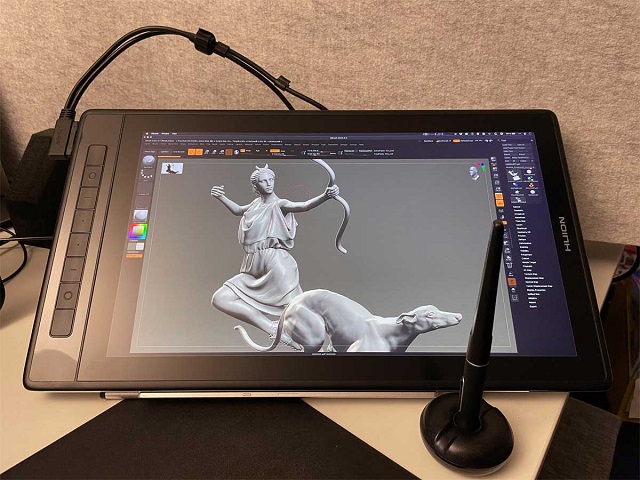
Like the UGEE UE16 this Huion Kamvas Pro 16 has a great 15.6-inch laminated screen at a great price. The surface is made of etched glass instead of matte screen protector.
The biggest upgrade here is the 2.5k (2560 x 1440) QHD display which looks fantastic on this smaller screen.
Its gamut colour reaches 145% sRGB accuracy, making the colour more visible and sharp and enhancing every detail of your work.
The battery-free stylus features PenTech 3.0+ technology, has lower sensor position of 3.5mm, 8192 levels of pressure and ±60° tilt response that offers great precision.
The 15.6inch display is big enough to work smoothly, it has 8 express keys for a seamless drawing experience.
Huion Kamvas Pro 16 is absolutely something to consider if youre searching for a high-quality Wacom Cintiq 16 alternative.
7. Huion Kamvas 22 Plus

Huion Kamvas 22 Plus is a a worthy alternative to the Wacom Cintiq 22, You get the same 22” screen, as well as a set of other useful features at a much more reasonable price.
The Kamvas 22 Plus features a 1080p QLED display, which offers incredible color accuracy thanks to the 140% sRGB. This is way more than the 96% on the Cintiq 22.
The tablets screen is fully laminated to reduce parallax and improve the accuracy. It also uses scratch-resistant etched glass surface to provide you with a more nature drawing experience.
Meanwhile, its battery-free stylus uses advanced PenTech 3.0+ technology boasts 8192 levels of pressure sensitivity, as well as supports 60 degrees of tilt.
Overall, Youll enjoy the smooth and consistent strokes of the stylus for a pleasant drawing experience. Considering the price of the Kamvas 22 Plus tablet, you wont find a better bargain on offer.
8. XPPen Artist Pro 22 (Gen 2)

The 21.5-inch XPPen Artist Pro 22 (Gen 2) is one of the most recommended Wacom Cintiq 22 alternatives out there with accurate, and responsive stylus and gorgeous screen.
The huge IPS display is crisp,and vivid with an excellent 2.5K QHD Resolution and a stunning color accuracy of 99% Adobe RGB. This is surprising to find at this price point.
The display is fully laminated to reduce parallax and improve stylus accuracy. Plus the AG Nano etched glass on top provides a better drawing surface.
With 3g IAF, 16384 levels of pressure sensitivity and 60 degrees of tilt support, the X3 Pro stylus has a good drawing performance and draws smooth and consistent strokes every single time.
It does not have any shortcut buttons but include a ACK05 Shortcut Remote that features 10 customizable buttons and a big tactile dial for zoom in and out.
All things considered, the XPPen Artist Pro 22 (Gen 2) is an ideal tablet for those looking for a large and feature-rich drawing device.
9. XPPen Artist 24 Pro (2.5K)
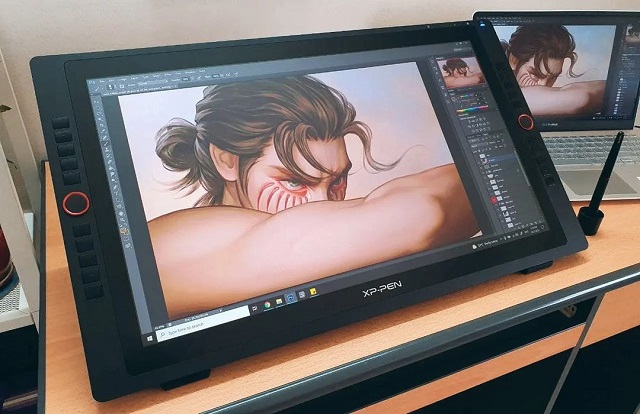
If youre looking for an alternative to the 24-inch Wacom Cintiq Pro 24, the XPPen Artist 24 Pro is worth looking at.
This is an IPS monitor with 2.5K QHD Resolution and 90% Adobe RGB color coverage, meaning it offers rich colors, details and accuracy with various viewing angles.
The matte screen protector reduces the glare. Your screen will continue to look clear and beautiful, even if its bright.
The 20 fully customizable keys make your work more effective, and even it can work with both hands. It also has 2 red roller wheels that lets you zoom in and out, scroll through the layers, etc.
The PA2 battery-free pen has 8192 pressure levels and tilt Sensitivity, giving you a smooth and great experience while working on the operation.
Overall, this is a great option for those you enjoy working on large screens for detailed work.
10. Huion Kamvas Pro 24 (4K)

Huion Kamvas Pro 24 is a 23.8-inch pen display with a QLED panel. The 4K UHD high-resolution screen comes with 140% sRGB color space looks great and is suitable for professional artists.
It has a nice texture applied to the surface of the display, minimum screen parallax, thanks to the full lamination technology and etched glass surface.
There are no shortcut or express keys, so it really looks like an extra monitor. But it includes a portable shortcut key remote that has18 buttons and a mechanical dial.
Topping that up is its precision pen that boasts a stellar 8,192 sensitivity level, Tilt detection and PenTech 3.0+ technology.
The performance is just as impressive as what the Wacom Cintiq Pro 24 offers. It is smooth and the feedback is more than satisfying.
In Conclusion
In the end, you’re just trying to reduce cost and get decently cheap products to make simple art, not to pay more to get the most performance tablet for professional drawing.
Wacom Cintiq alternatives are not equal to wacom Cintiq, but it’s close. Every year their products get better and bette.
With these 10 pen display tablets to choose from, Now you should be able to find the best Wacom Cintiq alternative without going over budget. I hope you’ll find this list useful!
- 12 Best Budget Drawing Pen Tablets for Taking Handwritten Notes
- How to Choose the Best Drawing Tablet? Ultimate Guide for Beginners
- 12 Best Apps to Draw Tattoo Designs in 2026
- Wacom Cintiq 24 (2025) vs Huion Kamvas Pro 24 (Gen 3) Comparison
- Wacom Intuos vs XPPen Deco 01 V3 Comparison: Which is Better?
- 10 Good Cheap Mechanical Keyboards Under $50 in 2026


