Updated: November 2026
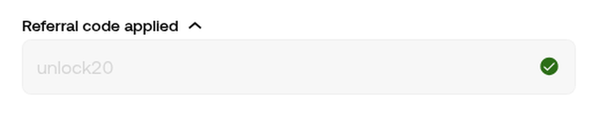
The OKX sign up bonus with invite code UNLOCK20 is a 20% trading fee discount, returned to you as a rebate on the fees you pay. Enter UNLOCK20 in the "Invite code (optional)" field during registration, because it usually cannot be added after the account is created.
- What is the OKX sign up bonus?
- How much can you save with invite code UNLOCK20?
- How do you use the OKX sign up bonus step by step?
- Where do you enter the invite code?
- Does the OKX sign up bonus cover every type of trade?
- Is identity verification required for the OKX sign up bonus?
- Are there any other OKX bonuses for new users?
- Frequently asked questions about the OKX sign up bonus
- Risk notice
What is the OKX sign up bonus?
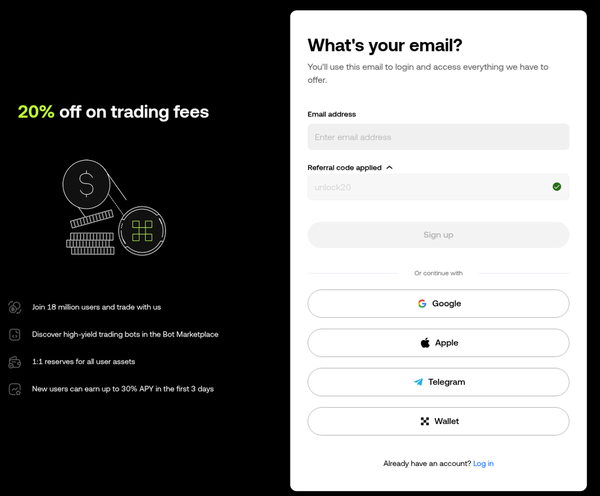
The OKX sign up bonus with the code UNLOCK20 is a 20% rebate on trading fees you pay as a new user. OKX does not currently offer a fixed cash welcome bonus for new accounts, so the fee rebate is the main benefit of signing up with this code.
The rebate applies to both maker and taker orders. Your VIP level does not change, and the rebate is calculated from the fee you actually paid.
How much can you save with invite code UNLOCK20?
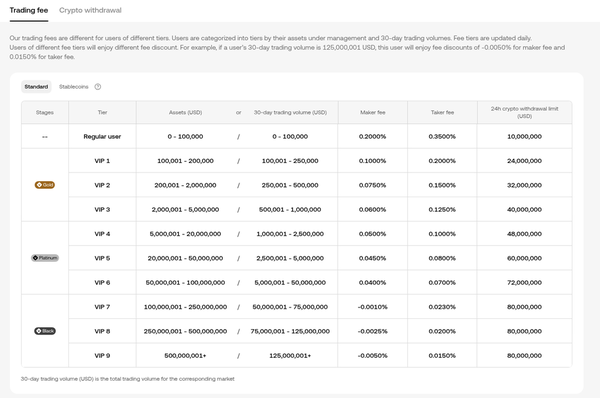
At the Regular fee level, a taker fee of about 0.10% and a maker fee of about 0.08% drop after the 20% rebate to about 0.08% and 0.064%. The figures below are an example only. Check OKXs fee schedule for current rates.
How do you use the OKX sign up bonus step by step?
- 1 Open the sign-up link https://okx.com/join/UNLOCK20.
- 2 Enter your email or phone number and create a password.
- 3 Type UNLOCK20 in the "Invite code (optional)" field before you submit the form.
- 4 Complete identity verification, which OKX requires.
- 5 Secure your account with two-factor authentication, such as Google Authenticator.
- 6 Open the Invite perks tab after sign-up to confirm your rebate rate.
Where do you enter the invite code?
You enter UNLOCK20 in the optional invite code field on the registration form. The sign-up link fills it in automatically if you use it.
Once the account exists, you usually cannot add the code later, so check the field before you submit.
Does the OKX sign up bonus cover every type of trade?
No. The 20% rebate does not apply to Buy/Sell and Convert, because the cost of those trades is included in the spread. It applies to regular trading fees that you pay.
Is identity verification required for the OKX sign up bonus?
Yes. OKX requires identity verification (KYC) with a document and a selfie before you can use the account fully. Complete it as soon as you sign up so the rebate can apply to your trades.
Are there any other OKX bonuses for new users?
There is no fixed welcome bonus for new sign-ups right now. OKX runs occasional campaigns in the Rewards tab, and these can combine with invite code UNLOCK20. Check the Rewards tab after you register to see what is active.
Frequently asked questions about the OKX sign up bonus
What does the OKX sign up bonus with UNLOCK20 give?
It gives a 20% rebate on trading fees you pay on OKX. The code is UNLOCK20, and you must enter it during registration.
Can I add invite code UNLOCK20 after I register?
Usually no. Enter UNLOCK20 in the invite code field before you submit the sign-up form.
Does the 20% fee discount change my VIP level?
No. The rebate does not change your VIP level. It is calculated from the fee you actually paid.
Does the rebate apply to Buy/Sell and Convert?
No. Buy/Sell and Convert are excluded because their cost is included in the spread.
Is there a cash welcome bonus with the OKX sign up bonus?
No fixed cash welcome bonus is available right now. The main sign-up benefit is the 20% fee rebate with UNLOCK20.
Does OKX require identity verification?
Yes. OKX requires verification with a document and a selfie.
Is the 20% rebate available in every country?
Availability depends on your country. After sign-up, you can see your rate in the Invite perks tab.
Risk notice
Crypto trading involves risk, including the possible loss of your capital. The rebate lowers your costs but does not guarantee profit. This article is not financial advice.
Use the sign-up link here: https://okx.com/join/UNLOCK20, and enter invite code UNLOCK20 during registration.
This article contains affiliate links. If you sign up through them, we may receive a commission at no extra cost to you.
下一則: BONUSVIP Binance come aprire un account per principianti


